 THE ATHLETE HQ
Recruiting email setup
Connect your recruiting Gmail
College coach emails go out from the student-athlete's own Gmail, so coaches reply straight to them. Setup takes about 3 minutes. Do it on a phone or computer.
Before you start
- Use a Gmail just for recruiting. Name it with your first name, last name and class year, for example jordan.reyes2029@gmail.com. No iCloud, Yahoo or school email.
- Under 18? A parent signs the 1-minute consent form first.
- Know the password for that Gmail. If you forgot it, reset it at accounts.google.com/signin/recovery first.
Step by step
- Open your profile in the app (app.theathletehq.com/profile.html) and tap Connect my recruiting Gmail at the top of the page. On the phone app it opens your phone's browser.
- Sign in to Google with your recruiting Gmail. If Google shows a different account, tap Use another account.
- Google says Composio wants access. Composio is the secure service we use to connect your Gmail. Tap Continue.
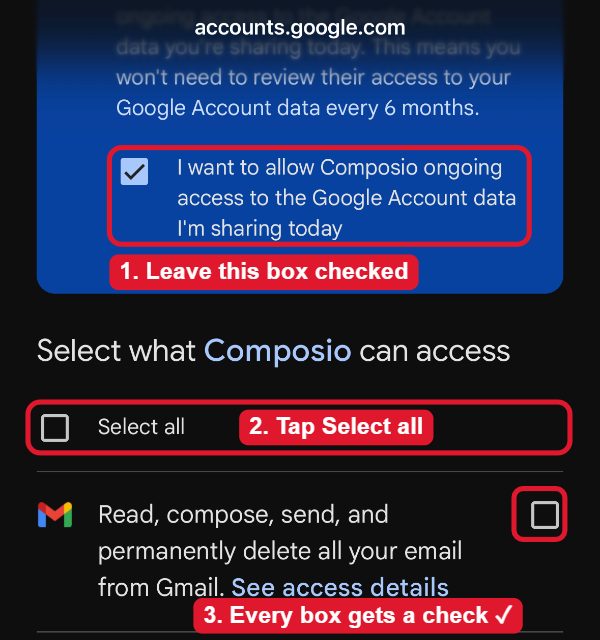
- On the "Select what Composio can access" screen: leave "I want to allow Composio ongoing access" checked, then tap Select all so every box gets a check. Then scroll down and tap Continue.
- Wait for the "Connected" page, then go back to the app. Your profile shows Connected with your Gmail address.
Why every box matters
- Read, compose and send email: we send your coach emails from your Gmail and read coach replies so they show up in your app and Target List.
- Your email address: confirms we connected the right account.
- The other boxes are part of Google's standard sign-in.
- If a box is left unchecked, the connection fails and coach emails can't go out. Just connect again and tap Select all.
We never see or store your password. You can remove access any time at myaccount.google.com/connections.